

 Jinba Flow
 Jinba App
 Jinba Toolbox
What is Connector Management
The Connector Management screen allows you to manage connectors that connect Jinba App with external services.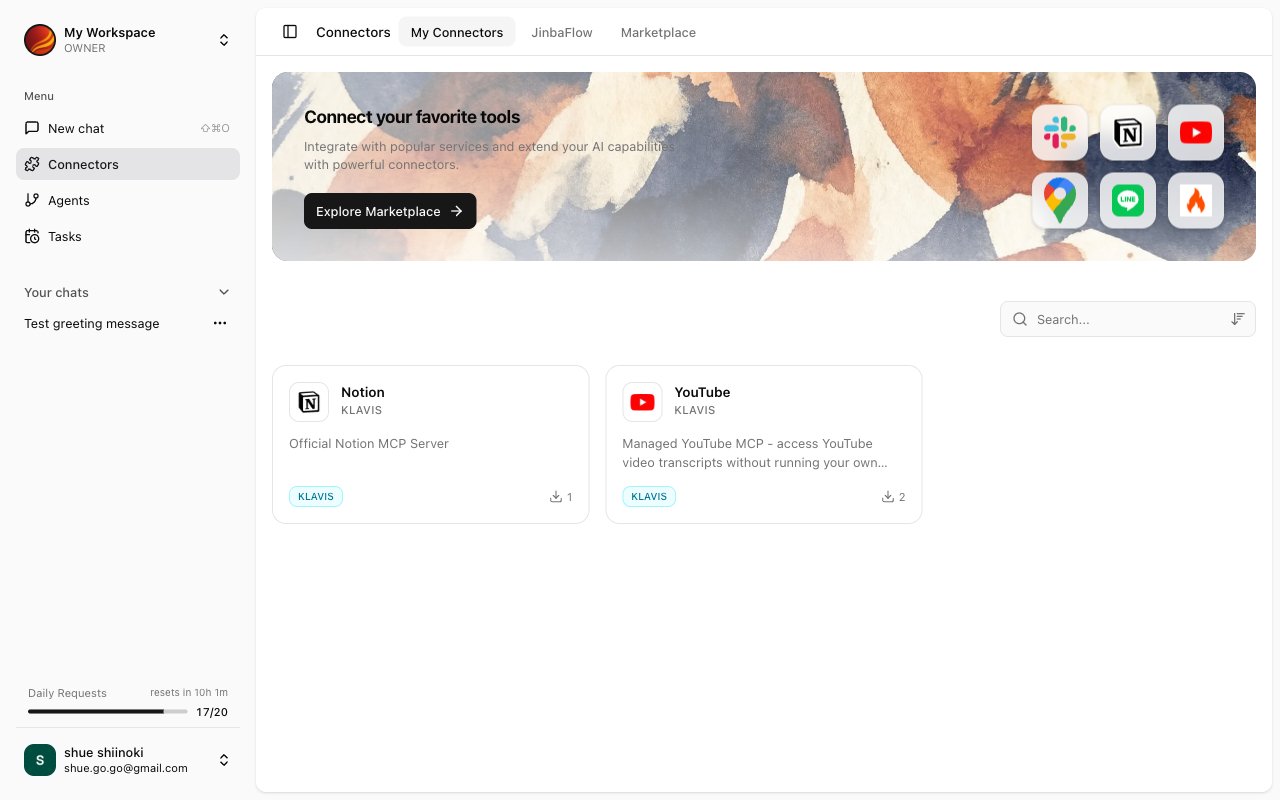
Screen Layout
The Connector Management screen consists of three tabs: “My Connectors”, “Jinba Flow” and “Marketplace”.My Connectors
Displays a list of installed connectors.- Search and sort connectors
- Refresh, edit, and delete connectors
- Run a connector’s tools individually (Form Execution)
Jinba Flow
Displays the Jinba Flow workspaces connected to Jinba App. Connecting a workspace installs its published flows as connectors.- Connect a Jinba Flow workspace with an API key or JWT
- Refresh a connection to sync the latest flows
- Disconnect a workspace
Types of Connectors
Various types of connectors are available in Jinba App.What Connectors Can Do
With connectors, AI can perform the following operations on external services:Retrieve Data
Get information from external services and use in chat
Create Data
Create new records or files in external services
Update Data
Update existing data in external services
Delete Data
Delete data in external services
Accessing Connector Management
1
Click 'Connectors' in the Side Panel
Select “Connectors” from the side menu.
2
Connector Management Screen Appears
The “My Connectors”, “Jinba Flow” and “Marketplace” tabs are displayed.
Key Features
My Connectors
List and search installed connectors
Marketplace
List and install standard MCPs
Managing Connectors
Refresh, edit, and delete connectors
Form Execution
Execute tools individually using forms
Jinba Flow
Connect and install Jinba Flow connectors