

 Jinba Flow
 Jinba App
 Jinba Toolbox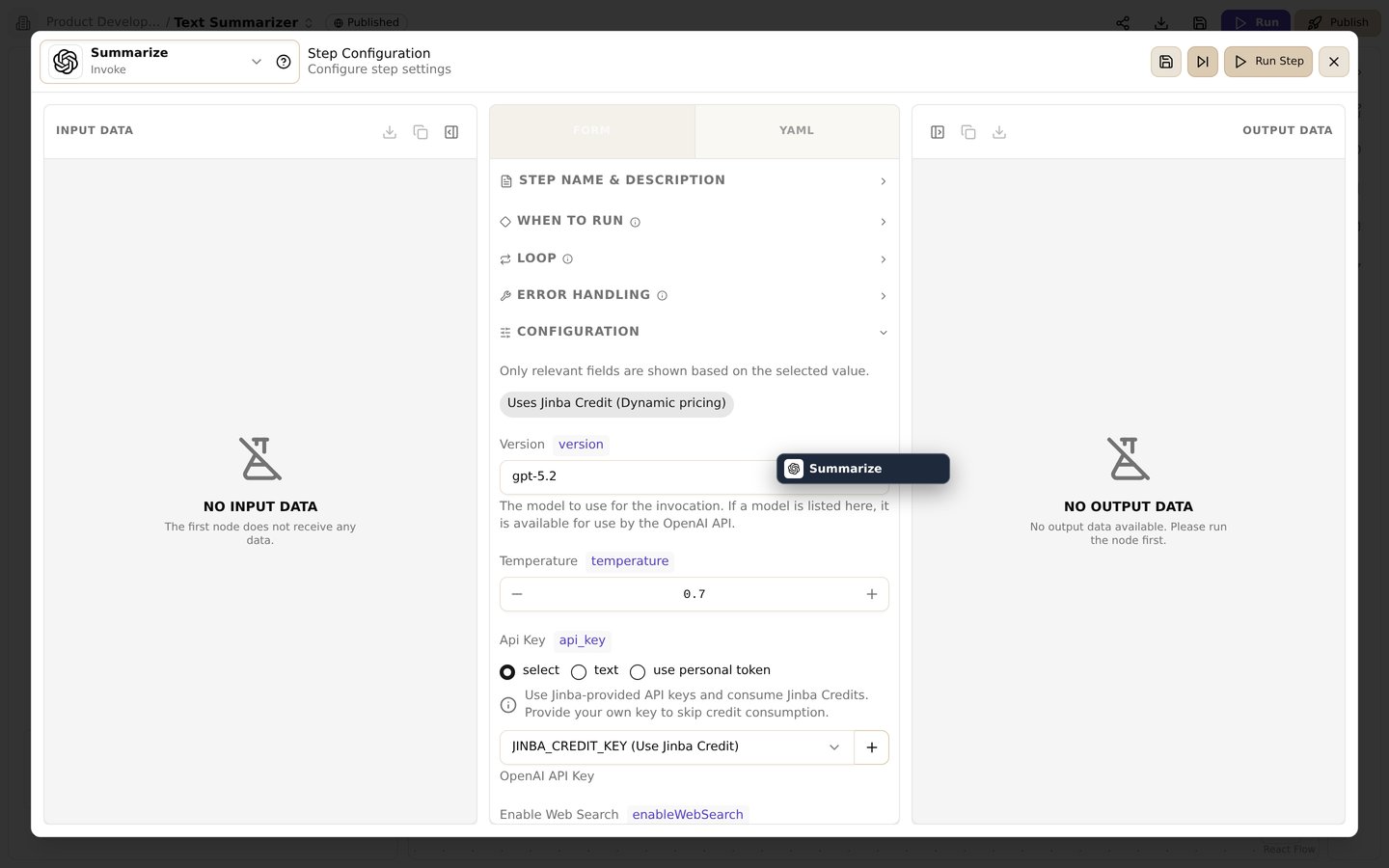
The step settings screen. Switch between form/YAML, configure run conditions, loops, and error handling, and inspect input/output data
Overview
Each step in a Jinba Flow can be configured with advanced options that control how and when it executes. These options allow you to create sophisticated workflows with conditional logic, loops, and complex dependencies.Step Dependencies (needs)
Theneeds option specifies which steps must complete before the current step can run. This creates an execution order and ensures data is available when needed.
Basic Usage
fetch_data and validate_input stand for earlier steps in your flow; fetch_data’s result is assumed to be a list.
Key Points
- Execution Order: Order comes only from
needs. Referencing{{steps.X...}}does not make a step wait forX, so list every step whose output you read - Parallel Execution: Steps that don’t depend on each other can run in parallel
- Failure Handling: If a needed step fails or is cancelled, this step is cancelled, and so are the steps that depend on it. If every needed step was skipped, this step is skipped; a skipped step alongside one that succeeded does not stop it. A step with
whenignores these rules and follows its condition (see below) - forEach Dependencies: A forEach step counts as succeeded if at least one item succeeded or it had no items, and as failed if no item succeeded and at least one failed or was cancelled
- Diamond Patterns: Complex dependency graphs are supported (A→B, A→C, B→D, C→D)
Example: Multi-Branch Workflow
PYTHON_SANDBOX_RUN uses the value of the last line as its result and stores it under result.data. With data_type: OBJECT, a final json.dumps(...) is returned as structured data. Reading a result through json.loads(r'''...''') avoids the breakage you get from pasting JSON (null, true, false) straight into Python.
Conditional Execution (when)
Thewhen option allows a step to execute only if a specified condition is true. This enables dynamic workflow behavior based on previous step results.
Basic Syntax
Condition Expressions
Conditions are CEL expressions, written directly without{{ }}:
- String Comparison:
steps.check.result.status == 'success' - Numeric Comparison:
steps.count.result.total > 5 - Boolean Evaluation:
steps.validate.result.isValid - Step Status:
steps.fetch_data.status == 'failed' - Combining:
&&,||,!
{{ }} placeholders are filled in first, then the text is evaluated as CEL. Put quotes around placeholders that produce strings, for example "'{{steps.check.result.status}}' == 'success'".
Example: Conditional Branching
Important Notes
- Conditions are evaluated before step execution.
item,itemIndexanditemCountare not available inwhen - If the condition is false, the step status becomes
skipped - A step whose needed steps were all skipped is skipped too; if another needed step succeeded, it still runs
- When
whenis set, the condition alone decides whether the step runs, and a failed needed step does not cancel it.when: "true"runs a step even after a needed step failed;when: "steps.X.status == 'failed'"runs it only in that case - If the condition cannot be evaluated (for example, a placeholder renders as empty text), the step is marked
failed
Loop Execution (forEach)
TheforEach option executes a step multiple times, once for each item in a collection. This is useful for batch processing lists of data.
Basic Syntax
forEach also accepts the template form, "{{steps.get_list.result}}".
How It Works
- The
forEachvalue is evaluated to get a list. If it is not a list, the step runs zero times, without an error - The step executes once for each item in the list
- In the step’s inputs,
{{item}}is the current item,{{itemIndex}}its position (from 0), and{{itemCount}}the number of items. For an object item use{{item.<property>}}or{{item | json}};{{item}}alone renders as[object Object] - Later steps see
steps.<step_id>as a list with one entry (status,result,error) per item.steps.<step_id>.resultis the list of results from the items that succeeded, andsteps.<step_id>.statusissuccess,partialorfailed
Example: Processing Multiple Items
PYTHON_SANDBOX_RUN, the current item is also available as the Python variable item. Each greeting is stored as {"data": "Hello, Alice!"}, which is why combine_greetings reads g["data"].
Accessing Item Properties
forEach with Index
UseitemIndex (from 0) and itemCount to know where you are in the loop:
forEach Options
forEachOptions controls how the items are processed. In the step settings these are the Sequential / Parallel choice (with a thread count), the maximum number of items, and the Stop on error / Continue choice:
- concurrency: how many items run at the same time. Choosing Sequential saves
1; Parallel saves the thread count you enter. When it is not set, the loop runs with the deployment’s default parallelism. - maxItems: process only the first N items of the list. When it is not set, all items are processed.
- continueOnError:
true(Continue, the default) skips the items that fail and keeps looping;false(Stop on error) stops the loop after the batch in which an item failed, and the remaining items are markedskipped. To stop right after the first failure, setconcurrency: 1.
Combining Options
You can combineneeds, when, and forEach in a single step:
check_enabled stands for an earlier step in your flow whose result contains a boolean active.
- Wait for all
needssteps to finish - If
whenis set, run only if it is true. Withoutwhen, the outcome of theneedssteps decides (cancelled or skipped, as described above) - Execute the
forEachloop (or a single execution if there is noforEach)
Best Practices
Dependencies
- Keep dependency chains shallow when possible
- Use parallel execution to improve performance
- Clearly name steps to make dependencies readable
Conditions
- Use meaningful condition expressions
- Consider all possible outcomes (success, failure, edge cases)
- Test conditions with various input values
Loops
- Limit loop iterations to avoid long execution times
- Handle empty arrays gracefully
- Consider memory usage for large datasets
Related
- YAML Coding Panel - Complete YAML syntax reference
- Variables & Templates - Variable placeholders and Nunjucks templates
- Debug - Debugging workflow execution