

 Jinba Flow
 Jinba App
 Jinba Toolbox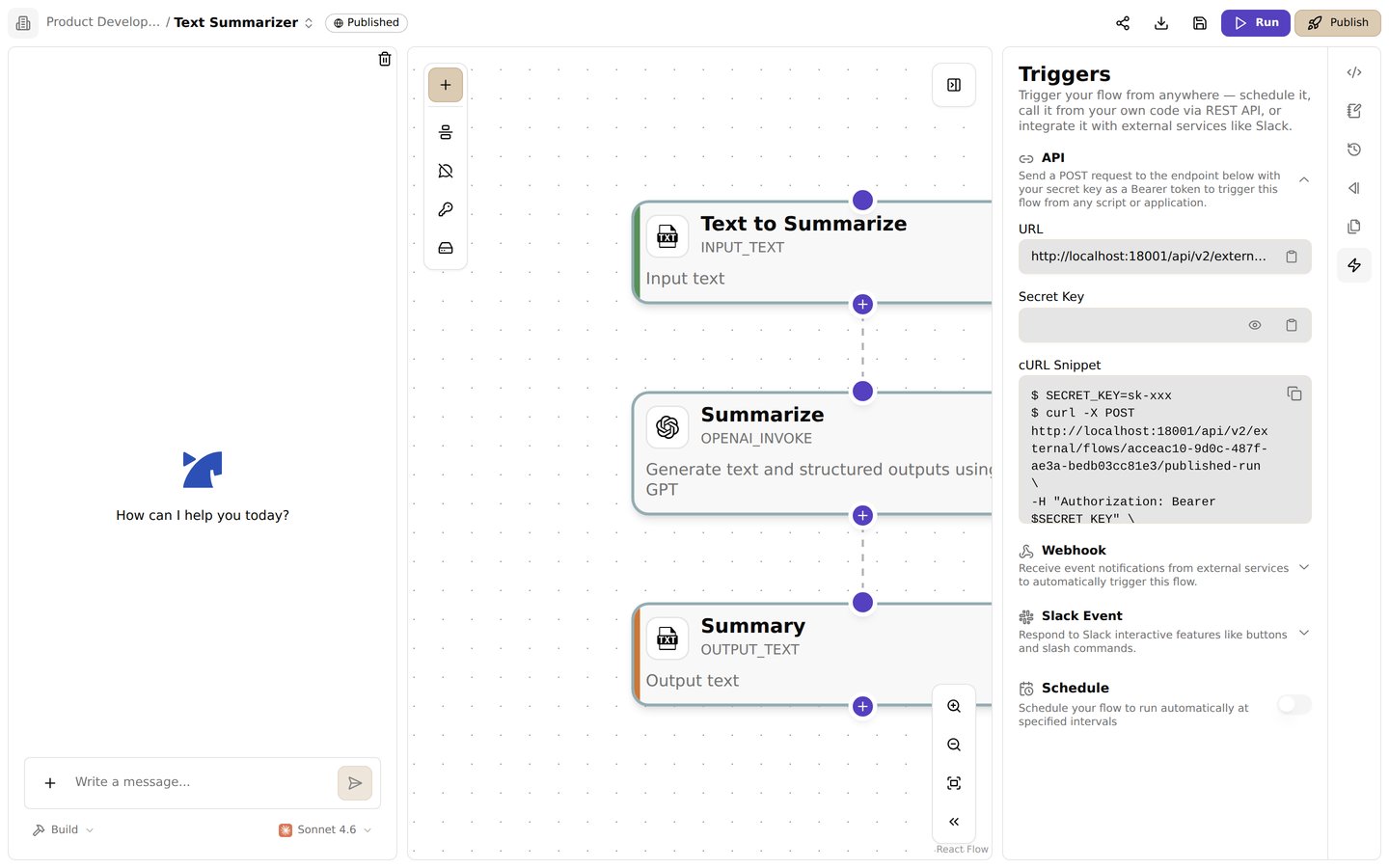
The Triggers panel shows the published flow endpoint, its secret key, and a ready-to-copy cURL request
Before you start
- Publish the flow you want to call.
- Add an
INPUT_*step for each value the caller must provide. The step ID is the argument name. - Copy the endpoint and secret key from the flow’s Triggers panel.
Run a flow synchronously
A synchronous request waits for the flow to finish. The API returns the run ID, status, and step outputs. Set the URL and secret to the values shown in the Triggers panel, then send a request:FLOW_ID and YOUR_FLOW_SECRET with the values from the panel. The name argument must match the ID of an input step in the published flow. The mode field is optional; it defaults to sync.
A successful response has status: "success". It includes an id for the run and stepOutputs keyed by step ID. Each tool’s result shape depends on that tool. If the flow uses OUTPUT_* steps, their values also appear in result. A run that fails returns status: "failed"; check error and the failed step’s entry in stepOutputs.
Call the flow from code
These examples read the URL and secret from the sameJINBA_FLOW_URL and JINBA_FLOW_KEY environment variables.
Python (with the requests package):
call-flow.mjs):
Pass numbers, JSON, and webhook payloads
Every argumentvalue must be a string. The API rejects a request that sends a number, boolean, or object as a value. Send numbers and booleans as text, such as "10" or "true", and serialize structured data to a JSON string.
For example, a webhook receiver can forward the event it received to a flow. Here, webhook_data is the ID of an INPUT_* step in the flow:
webhook_data step receives the whole event as JSON text. Async mode lets the receiver respond without waiting for the flow to finish; the returned id identifies the run.
To hand the flow a file already stored in Jinba Flow, pass jinbaflow://<fileId> as the value of an INPUT_FILE step. The server resolves it to a download URL before the flow runs. Only files in the flow’s own workspace resolve, whether the reference is a run argument or is saved in the flow’s steps and whatever starts the run (an API key, a webhook, a Slack message, a schedule). A reference to a file in another workspace reaches the flow unchanged, even if the flow’s owner or the key’s creator can access that workspace.
Run a flow asynchronously
For a flow that should continue in the background, setmode to async:
id and status: "running". To retrieve the run record and its output, send an authenticated GET request to:
GET /api/v2/workspaces (the list of your workspaces) answers 404 to it. Within its workspace it also cannot manage API keys, members, invites, or access settings, change the workspace’s visibility, share flows or publish templates, act on approval requests, use the chat relay, or archive, freeze, restore, delete, or move the workspace to another organization. Sign in to perform those operations.
Check a failed request
- 401 Unauthorized: Check that the request includes the flow secret in the
Authorization: Bearerheader. - 404 Not Found: Confirm the flow ID is correct and the flow has a published version.
- The flow runs but an input is empty: Use the exact ID of the
INPUT_*step as thenameinargs. - A step returns an error: Inspect that step’s output and check its tool documentation for required inputs, credentials, and permissions.