

 Jinba Flow
 Jinba App
 Jinba Toolbox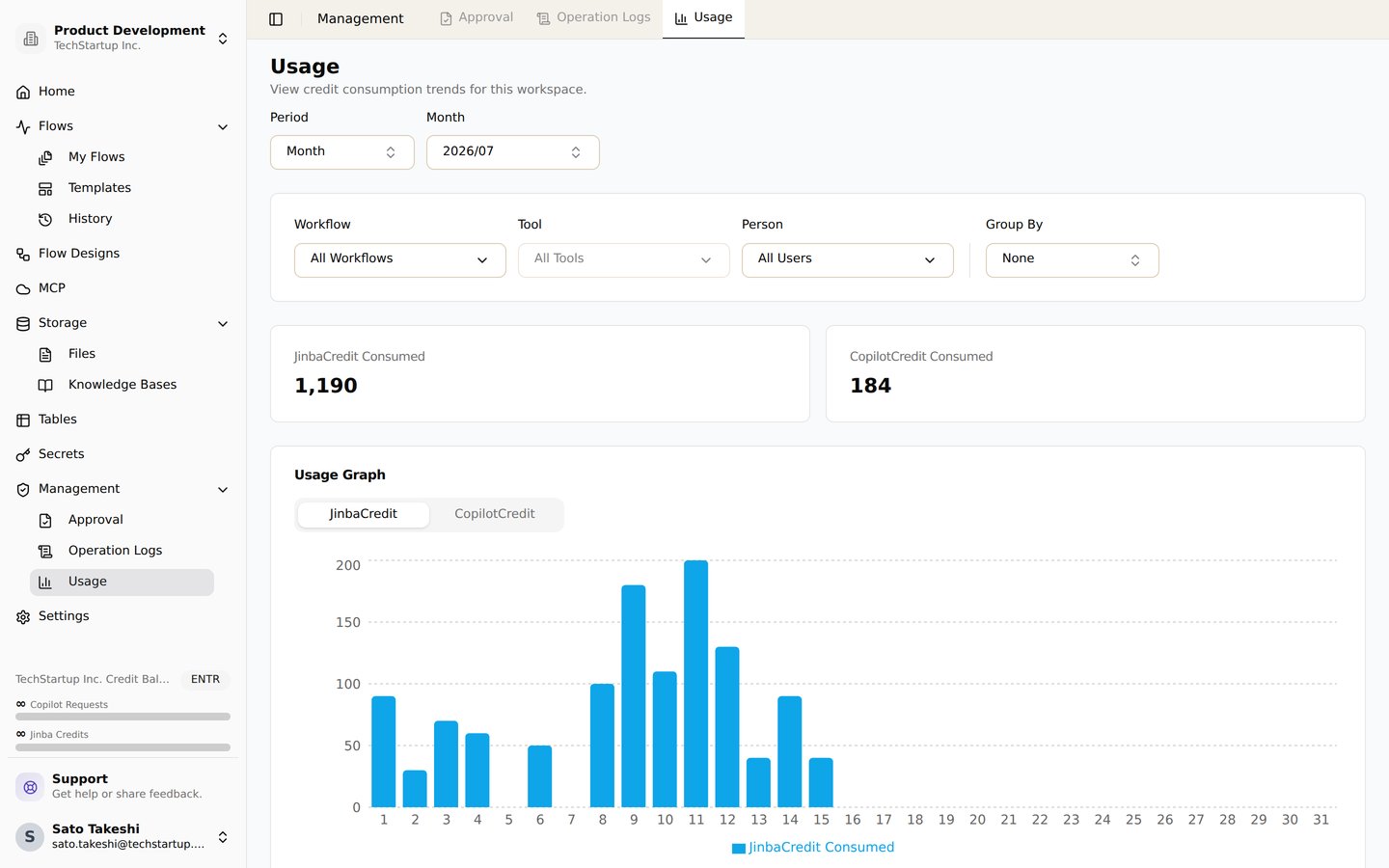
The usage page. Track Jinba Credit and Copilot Credit consumption by workflow, tool, and user
Overview
Jinba Flow charges two balances: Jinba Credits, which pay for running tools on Jinba’s API keys, and Copilot Credits, which pay for AI assistance. They are used for different things and reset on different schedules.Note: Credits and subscription tiers are managed at the organization level. All members of an organization share the same subscription plan and pooled credits.
At a Glance
- Some tools are charged to your organization’s balance when they run on Jinba’s API keys.
- For tools that support it, you can bring your own API key. The provider then bills you directly and nothing is charged to your balance.
- The app shows your balance, your usage and the price of each step in US dollars.
- A tool’s configuration page shows a badge: a fixed price, or “Dynamic pricing” for a tool whose price depends on the run.
- The usage page shows what each run was actually charged.
Credit Types
Jinba Credits
Jinba Credits pay for executing tools in workflows. They let you use Jinba’s API keys without needing your own credentials. Credits are pooled per organization.- Reset Period: Monthly (resets on subscription renewal or every 30 days for enterprise users)
- Usage: Deducted when running workflow tools like AI models, search APIs, and data processing services
- Pricing: Each tool is priced in one of the ways described in How Tools Are Priced
- Custom API Key Bypass: You can provide your own API keys to bypass charges for certain tools
- Monthly usage included:
- Free: $3
- Standard: $20
- Professional: $250
- Enterprise: Custom
Copilot Credits
Copilot Credits pay for AI assistance features and copilot functionality, such as generating step descriptions, summaries, and metadata. Credits are pooled per organization.- Reset Period: Daily (resets every day at midnight)
- Usage: Deducted when using copilot features (1 credit per request)
- Daily Copilot Requests:
- Free: 100
- Standard: 300
- Professional: 500
- Enterprise: Custom
In some organizations, including Free plan organizations, Copilot chat does not use the daily Copilot Credits. Each turn is charged by usage from the organization’s Jinba Credit balance instead, and is listed as Copilot in the usage breakdown. A turn needs a set amount of balance to start. A turn that costs more than that amount is still charged in full, so the balance can drop below $0. The next turn is then refused until the balance is topped up or reset.
How Tools Are Priced
Tools are priced in one of four ways:- Per token: for the LLM tools
- From the step’s settings: for image and video generation, and Browser Use Cloud
- From the provider’s charge: for usage-based search
- A fixed price per run: for everything else
Per-Token Pricing (LLM Tools)
These tools are billed from the tokens a run actually uses:- OPENAI_INVOKE / OPENAI_INVOKE_WITH_FILE
- ANTHROPIC_INVOKE / ANTHROPIC_INVOKE_WITH_FILE
- GEMINI_INVOKE / GEMINI_INVOKE_WITH_FILE / GEMINI_INVOKE_WITH_IMAGE
- GROK_CHAT
- OPENAI_DEEP_RESEARCH
- WORD_TEMPLATE_GENERATE
- TRANSLATE_PPTX_FILE
- LLAMA_CLOUD_QUERY
- ANTHROPIC_AGENT
- BROWSER_USE_SANDBOX_RUN_TASK
-
What is counted. The cost is calculated from the model you select and the tokens the run reports:
- input and output tokens
- on models that support prompt caching, cached reads and cache writes, each at its own rate
- with web search enabled, each search the provider runs
-
Long-context rates. Some models bill a whole request at higher rates once its prompt (input plus cached tokens) crosses a long-context threshold, and the cost follows those rates:
- the
gpt-5.5andgpt-5.6families above 272K tokens gemini-3.1-pro-previewandgemini-2.5-proabove 200K- the Grok models from 200K
- the
- Reservation. Before the step runs, a reservation is held against your balance, so a run cannot start unless you can cover it. When the step finishes, the reservation is replaced by the real cost, which is usually lower.
- Runs without usage. When a run reports no token usage at all, or the model it ran has no published rate, it keeps its reservation. Each tool also has a minimum charge, and such a run is never charged less than that. BROWSER_USE_SANDBOX_RUN_TASK is the exception: it settles at its minimum, not its reservation. A run that does report tokens on a priced model settles at its actual token cost, with no minimum applied.
Every other tool in the list above reserves close to its minimum.
Steps inside a subflow or loop step are charged too. Before it starts, the enclosing step reserves one pass over its inner steps. It then settles at what the inner steps that actually ran cost, as a single entry on the enclosing step rather than one per inner step.
A run that cannot cover its reservation fails to start with an insufficient-balance error. This happens even when the work itself would have cost far less than the amount held.The balance a run can draw on is your organization’s balance minus what its other unfinished runs have reserved, so runs started together each need their own headroom.Settlement never checks the balance. A run that costs more than it reserved can leave the balance negative, and until it is topped up no new run that reserves credits can start.
Media Generation Pricing
These tools produce no tokens, so they are priced from what they generate. The cost depends only on the step’s settings.- OPENAI_SORA2 is billed per second of video. The rate is set by the model (
sora-2orsora-2-pro) and, forsora-2-pro, the output resolution (720x1280 / 1280x720, or 1024x1792 / 1792x1024). - GEMINI_GENERATE_IMAGE is billed per image generated, at a rate set by the model (
gemini-3.1-flash-image,gemini-nano-banana-2.1,gemini-3.1-flash-lite-image,gemini-2.5-flash-imageorgemini-3-pro-image). New steps default togemini-3.1-flash-image.
gemini-2.5-flash-image, for example, moves to gemini-3.1-flash-lite-image on 2027-03-15.
Sometimes a setting that drives the cost (a model, a duration, a resolution) is filled in by an expression such as
{{ steps.plan.output.model }}. Its value is not known until the step runs, so the reservation assumes the most expensive option it could resolve to. The final charge is the price of what actually ran.Usage-Based Search
These tools are charged from what the provider bills for each call (can use your own API key):- PERPLEXITY_SEARCH - Tokens at the selected Sonar model’s rate plus Perplexity’s per-request fee. Sonar Deep Research also bills its searches, citation tokens and reasoning tokens, so it costs much more than
sonar. A run that reports no usage keeps its reservation. - EXAAI_SEARCH - Priced by search type, number of results and contents (text, highlights). More results, deeper search types and more contents cost more.
Browser Use Cloud
- BROWSER_USE_RUN_TASK - Priced from
max_steps: Browser Use’s per-task fee plus its per-step fee, so a largermax_stepscosts more. The step is charged for its fullmax_stepseven when the task finishes in fewer steps (can use your own API key).
Fixed Price Per Run
These tools are charged a fixed price each time they run:- PYTHON_SANDBOX_RUN - Execute Python code in a secure sandbox (always requires credits)
- SERPAPI_SEARCH - Search using SerpAPI (can use your own API key)
- FIRECRAWL_SCRAPE - Scrape web content using Firecrawl (can use your own API key)
- ARXIV_INVOKE_AGENT - Access research papers from arXiv (always requires credits)
- YOUTUBE_GET_TRANSCRIPT - Extract transcripts from YouTube videos (always requires credits)
- LLAMA_CLOUD_PARSE - Parse documents with LlamaCloud (can use your own API key)
- JINBA_FLEX_PARSER - Flexible document parsing (can use your own API key)
- JINBA_MODULES_PARSE, JINBA_MODULES_EXTRACT, JINBA_MODULES_CHECKER_V2, CHECKER_CHECK_BY_JSON, CHECKLIST - Run on Jinba’s model keys
Knowledge Base Uploads
Adding a file to a knowledge base is charged to your Jinba Credits from the tokens the upload uses. Two kinds of tokens are counted:- the embedding tokens of every chunk (
text-embedding-3-large) - for PDF pages that have no text layer, the Gemini OCR tokens that read them
Copilot Credit Usage
Copilot Credits are consumed when using AI assistance features:- Step Description Generation: 1 credit per request
- Flow Summary Generation: 1 credit per request
- Metadata Generation: 1 credit per request
- Cron Expression Parsing: 1 credit per request
- Chat/Copilot Conversations: 1 credit per request, or charged from the Jinba Credit balance (see the note under Copilot Credits)
Bring Your Own API Key
For tools that support it, you can provide your own API keys to avoid being charged:When a tool supports “bring your own API key,” you can configure your own credentials to bypass charges. Tools marked “always requires credits” are charged regardless of configuration.
How to Configure Your API Keys
- Navigate to the Credentials section in your workspace settings
- Select the appropriate service (e.g., Anthropic, OpenAI, Gemini)
- Enter your API key
- Save your configuration
A step whose API-key field points at your own secret only ever runs on that key. If the secret it references has been deleted or is empty, the step fails with a
MissingApiKeySecret error before the tool is called; it does not silently run on Jinba’s key. Re-create the secret, or set the field back to Jinba credits.Tools That Always Require Credits
Some tools always require credits because they use Jinba’s infrastructure or specialized services:- ARXIV_INVOKE_AGENT - Uses OpenAI API + E2B sandbox
- YOUTUBE_GET_TRANSCRIPT - Uses Smartproxy residential proxy
- PYTHON_SANDBOX_RUN - Uses E2B code interpreter sandbox