> ## Documentation Index
> Fetch the complete documentation index at: https://docs.jinba.io/llms.txt
> Use this file to discover all available pages before exploring further.
# Tools Overview
> Explore the full catalog of tools available in Jinba Flow
 ## Overview
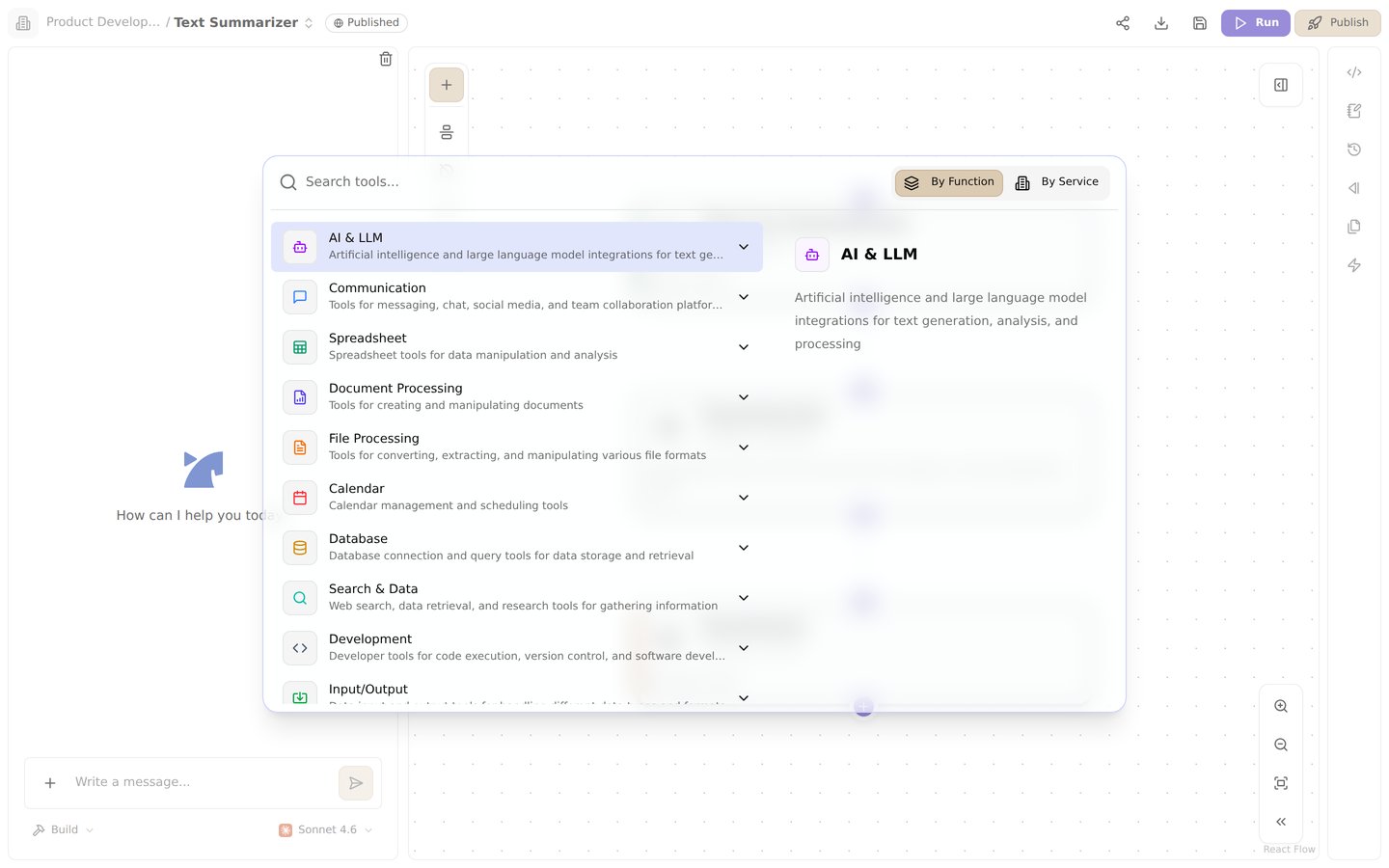
Tools are the building blocks of Jinba Flow workflows. Each step in a flow uses a tool to perform a specific action — from calling AI models and processing files, to integrating with external services and searching the web.
Jinba Flow offers a rich collection of tools organized into the categories below, giving you everything you need to build powerful automations. This page covers the tools that are currently documented — more tool documentation is being added continuously.
## Tool Categories
### Input/Output Tools
Tools for receiving data into your flow and producing structured output.
* [File Input](/en/pages/tools/files/input) - Fetch files from URLs
* [Advanced Input Tools](/en/pages/tools/files/input_advanced) - Webhooks, Slack events, image files, and text files
* [Input JSON with Validation](/en/pages/tools/validation/input) - Validate JSON input against a schema
* [Output Tools](/en/pages/tools/files/output_tools) - Create and manage output files and text data
* [Output JSON with Validation](/en/pages/tools/validation/output) - Validate JSON output against a schema
### AI Tools
Integrate with leading AI models to add intelligence to your workflows.
* [Gemini](/en/pages/tools/ai/gemini) - Invoke responses from Google Gemini
* [Gemini with File](/en/pages/tools/ai/gemini_with_file) - Generate text from files (PDF, image, audio, video)
* [Grok](/en/pages/tools/ai/grok) - Invoke responses from xAI Grok
* [Anthropic](/en/pages/tools/ai/anthropic) - Invoke responses from Claude
* [OpenAI](/en/pages/tools/ai/openai) - Invoke responses from OpenAI models
* [Azure OpenAI](/en/pages/tools/ai/azure_openai) - Invoke OpenAI models hosted on Microsoft Azure
* [LlamaCloud](/en/pages/tools/ai/llama_cloud) - Advanced document processing and search
* [LlamaCloud Advanced](/en/pages/tools/ai/llama_cloud_advanced) - Advanced search and query with LlamaIndex integration
### File Processing Tools
Extract, convert, and validate data from various file formats.
* [Extract from File](/en/pages/tools/files/extract) - Extract information from files using base64
* [Document Processing](/en/pages/tools/files/document_processing) - Extract and process text from various document formats
* [Word Processing](/en/pages/tools/files/word_processing) - Advanced Word document processing and text highlighting
* [Reducto](/en/pages/tools/files/reducto) - High-accuracy document parsing, extraction, and splitting
* [VTT Parse](/en/pages/tools/files/vtt_parse) - Parse WebVTT subtitle/transcript files into structured data
* [Marp Presentation](/en/pages/tools/files/marp) - Convert Markdown into presentation files
* [Mermaid Diagram](/en/pages/tools/files/mermaid) - Convert Mermaid syntax into images and PDFs
* [Markitdown Convert](/en/pages/tools/validation/markitdown_convert) - Convert a URL to Markdown
* [Checker Tools](/en/pages/tools/validation/checker_tools) - Data validation and checking for quality assurance
* [Jinba Modules Checker V2](/en/pages/tools/validation/jinba_modules_checker_v2) - Advanced rule-based document and data validation
* [Data Conversion Tools](/en/pages/tools/validation/data_conversion) - Convert data between different formats and structures
### External Service Integration Tools
Connect your flows to productivity platforms, communication tools, and business services.
**Productivity:**
* [GitHub](/en/pages/tools/productivity/github) - Automate GitHub tasks
* [Jira](/en/pages/tools/productivity/jira) - Manage Jira issues and project progress
* [Notion](/en/pages/tools/productivity/notion) - Automate a Notion workspace
* [Google Sheets](/en/pages/tools/productivity/google_sheets) - Spreadsheet operations using Google Sheets API
* [Advanced Google Sheets](/en/pages/tools/productivity/google_sheets_advanced) - Enhanced Google Sheets with get sheet functionality
* [Google Spreadsheet Advanced](/en/pages/tools/productivity/google_spreadsheet) - Bulk data manipulation for Google Spreadsheets
* [Google Forms](/en/pages/tools/productivity/google_forms) - Create and manage Google Forms
* [Excel Operations](/en/pages/tools/productivity/excel) - Comprehensive Excel file manipulation
* [Google Calendar](/en/pages/tools/productivity/google_calendar) - Automate Google Calendar tasks
* [Outlook Calendar](/en/pages/tools/productivity/outlook_calendar) - Automate Outlook Calendar tasks
* [Chatwork](/en/pages/tools/productivity/chatwork) - Connect with the Chatwork API
* [SharePoint](/en/pages/tools/productivity/sharepoint) - Manage SharePoint sites and OneDrive files
* [Microsoft Teams](/en/pages/tools/productivity/teams) - Manage Teams channels and messages
* [SmartHR](/en/pages/tools/productivity/smarthr) - List, create, update, delete, and invite employees (crews) in SmartHR
* [Box](/en/pages/tools/productivity/box) - Manage files and folders in Box
* [Linear](/en/pages/tools/productivity/linear) - Manage Linear issues, teams, and project progress
* [Zoom](/en/pages/tools/productivity/zoom) - Manage Zoom meetings, participants, and cloud recordings
* [Microsoft Users](/en/pages/tools/productivity/microsoft_users) - Look up users in Microsoft Entra ID (Azure AD)
**Communication:**
* [Gmail](/en/pages/tools/communication/gmail) - Email operations using Gmail API
* [Outlook Mail](/en/pages/tools/communication/outlook_mail) - List and send emails via Microsoft Outlook
* [Slack](/en/pages/tools/communication/slack) - Slack messaging platform tools
* [Discord](/en/pages/tools/communication/discord) - Integrate with a Discord Bot
* [LINE](/en/pages/tools/communication/line) - LINE messaging platform tools
* [Twilio](/en/pages/tools/communication/twilio) - Send SMS and WhatsApp messages via Twilio
* [Intercom](/en/pages/tools/communication/intercom) - Create contacts, messages, and customer events in Intercom
* [X (Twitter)](/en/pages/tools/communication/x) - Post and retrieve content via the X API
* [ChatWork Advanced](/en/pages/tools/communication/chatwork_advanced) - Advanced ChatWork messaging and task management
* [Faximo FAX Service](/en/pages/tools/communication/faximo) - Send FAX messages and search FAX history
### Search & Data Retrieval Tools
Search the web, query databases, and retrieve information from various sources.
* [SerpAPI](/en/pages/tools/search/serpapi) - Search the web using SerpAPI
* [PokeAPI](/en/pages/tools/search/pokeapi) - Search for Pokemon data
* [YouTube Transcript](/en/pages/tools/search/youtube) - Get YouTube video transcripts
* [Arxiv Agent](/en/pages/tools/search/arxiv) - Search and retrieve papers from arXiv
* [Exa AI](/en/pages/tools/search/exaai) - Search the web using Exa AI
* [Perplexity](/en/pages/tools/search/perplexity) - Search the web using Perplexity
* [Pinecone](/en/pages/tools/search/pinecone) - Query and manage vector indexes in Pinecone
* [Teradata](/en/pages/tools/search/teradata) - Run queries on Teradata
* [Carnot Search](/en/pages/tools/search/carnot_search) - Search for company information
* [Azure AI Search](/en/pages/tools/search/azure_ai_search) - Query Azure AI Search indexes
* [AWS Bedrock Knowledge Base](/en/pages/tools/search/aws_bedrock_knowledge_base) - Retrieve from and sync documents to Bedrock knowledge bases
* [TinyFish](/en/pages/tools/search/tinyfish) - AI web agent for fetching, searching, and interacting with websites
### Database Tools
Run SQL queries against external databases.
* [Snowflake](/en/pages/tools/database/snowflake) - Run SQL queries on Snowflake
* [PostgreSQL](/en/pages/tools/database/postgres) - Run SQL queries on PostgreSQL
### Extended Tools
Run custom code, connect via MCP, generate media, and manage content.
* [Python Sandbox](/en/pages/tools/sandbox/python_sandbox_run) - Run Python code in a sandboxed environment
* [Browser Use Sandbox](/en/pages/tools/sandbox/browser_use_sandbox) - Run browser automation tasks in an isolated sandbox
* [MCP Tools](/en/pages/tools/sandbox/mcp_tools) - Model Context Protocol integration for local and remote tool execution
* [Shopify](/en/pages/tools/productivity/shopify) - Manage Shopify products and orders
* [Netsea](/en/pages/tools/productivity/netsea) - Connect to the Netsea API
* [AI Video Generation](/en/pages/tools/media/video_generation) - Create videos from text descriptions using AI
* [WordPress](/en/pages/tools/cms/wordpress) - Create articles on WordPress
* [Firecrawl](/en/pages/tools/cms/firecrawl) - Automate web crawling and data collection
### Jinba Tools
Leverage Jinba's own platform capabilities within your flows.
* [Jinba Flows](/en/pages/tools/jinba/jinba) - Run Jinba Flows from within a flow
* [Jinba Modules](/en/pages/tools/jinba/jinba_modules) - Advanced data extraction, parsing, and validation
* [Vector Search](/en/pages/tools/jinba/vector_search) - Semantic search for knowledge bases using vector embeddings
* [Jinba Knowledge Base](/en/pages/tools/jinba/knowledge_base) - Update and manage knowledge bases for enhanced AI workflows
## How Tools Work
1. **One tool per step** — Each step in a flow executes exactly one tool.
2. **Configuration** — Set up the tool's behavior using its `config` and `input` fields.
3. **Result referencing** — Access a step's output in later steps using `{{steps..result}}`.
For example, you could use an **Input** tool to receive a PDF, a **Document Processing** tool to extract its text, and an **Anthropic** tool to summarize the content — all connected through result references:
```mermaid theme={null}
graph LR
A["Input
## Overview
Tools are the building blocks of Jinba Flow workflows. Each step in a flow uses a tool to perform a specific action — from calling AI models and processing files, to integrating with external services and searching the web.
Jinba Flow offers a rich collection of tools organized into the categories below, giving you everything you need to build powerful automations. This page covers the tools that are currently documented — more tool documentation is being added continuously.
## Tool Categories
### Input/Output Tools
Tools for receiving data into your flow and producing structured output.
* [File Input](/en/pages/tools/files/input) - Fetch files from URLs
* [Advanced Input Tools](/en/pages/tools/files/input_advanced) - Webhooks, Slack events, image files, and text files
* [Input JSON with Validation](/en/pages/tools/validation/input) - Validate JSON input against a schema
* [Output Tools](/en/pages/tools/files/output_tools) - Create and manage output files and text data
* [Output JSON with Validation](/en/pages/tools/validation/output) - Validate JSON output against a schema
### AI Tools
Integrate with leading AI models to add intelligence to your workflows.
* [Gemini](/en/pages/tools/ai/gemini) - Invoke responses from Google Gemini
* [Gemini with File](/en/pages/tools/ai/gemini_with_file) - Generate text from files (PDF, image, audio, video)
* [Grok](/en/pages/tools/ai/grok) - Invoke responses from xAI Grok
* [Anthropic](/en/pages/tools/ai/anthropic) - Invoke responses from Claude
* [OpenAI](/en/pages/tools/ai/openai) - Invoke responses from OpenAI models
* [Azure OpenAI](/en/pages/tools/ai/azure_openai) - Invoke OpenAI models hosted on Microsoft Azure
* [LlamaCloud](/en/pages/tools/ai/llama_cloud) - Advanced document processing and search
* [LlamaCloud Advanced](/en/pages/tools/ai/llama_cloud_advanced) - Advanced search and query with LlamaIndex integration
### File Processing Tools
Extract, convert, and validate data from various file formats.
* [Extract from File](/en/pages/tools/files/extract) - Extract information from files using base64
* [Document Processing](/en/pages/tools/files/document_processing) - Extract and process text from various document formats
* [Word Processing](/en/pages/tools/files/word_processing) - Advanced Word document processing and text highlighting
* [Reducto](/en/pages/tools/files/reducto) - High-accuracy document parsing, extraction, and splitting
* [VTT Parse](/en/pages/tools/files/vtt_parse) - Parse WebVTT subtitle/transcript files into structured data
* [Marp Presentation](/en/pages/tools/files/marp) - Convert Markdown into presentation files
* [Mermaid Diagram](/en/pages/tools/files/mermaid) - Convert Mermaid syntax into images and PDFs
* [Markitdown Convert](/en/pages/tools/validation/markitdown_convert) - Convert a URL to Markdown
* [Checker Tools](/en/pages/tools/validation/checker_tools) - Data validation and checking for quality assurance
* [Jinba Modules Checker V2](/en/pages/tools/validation/jinba_modules_checker_v2) - Advanced rule-based document and data validation
* [Data Conversion Tools](/en/pages/tools/validation/data_conversion) - Convert data between different formats and structures
### External Service Integration Tools
Connect your flows to productivity platforms, communication tools, and business services.
**Productivity:**
* [GitHub](/en/pages/tools/productivity/github) - Automate GitHub tasks
* [Jira](/en/pages/tools/productivity/jira) - Manage Jira issues and project progress
* [Notion](/en/pages/tools/productivity/notion) - Automate a Notion workspace
* [Google Sheets](/en/pages/tools/productivity/google_sheets) - Spreadsheet operations using Google Sheets API
* [Advanced Google Sheets](/en/pages/tools/productivity/google_sheets_advanced) - Enhanced Google Sheets with get sheet functionality
* [Google Spreadsheet Advanced](/en/pages/tools/productivity/google_spreadsheet) - Bulk data manipulation for Google Spreadsheets
* [Google Forms](/en/pages/tools/productivity/google_forms) - Create and manage Google Forms
* [Excel Operations](/en/pages/tools/productivity/excel) - Comprehensive Excel file manipulation
* [Google Calendar](/en/pages/tools/productivity/google_calendar) - Automate Google Calendar tasks
* [Outlook Calendar](/en/pages/tools/productivity/outlook_calendar) - Automate Outlook Calendar tasks
* [Chatwork](/en/pages/tools/productivity/chatwork) - Connect with the Chatwork API
* [SharePoint](/en/pages/tools/productivity/sharepoint) - Manage SharePoint sites and OneDrive files
* [Microsoft Teams](/en/pages/tools/productivity/teams) - Manage Teams channels and messages
* [SmartHR](/en/pages/tools/productivity/smarthr) - List, create, update, delete, and invite employees (crews) in SmartHR
* [Box](/en/pages/tools/productivity/box) - Manage files and folders in Box
* [Linear](/en/pages/tools/productivity/linear) - Manage Linear issues, teams, and project progress
* [Zoom](/en/pages/tools/productivity/zoom) - Manage Zoom meetings, participants, and cloud recordings
* [Microsoft Users](/en/pages/tools/productivity/microsoft_users) - Look up users in Microsoft Entra ID (Azure AD)
**Communication:**
* [Gmail](/en/pages/tools/communication/gmail) - Email operations using Gmail API
* [Outlook Mail](/en/pages/tools/communication/outlook_mail) - List and send emails via Microsoft Outlook
* [Slack](/en/pages/tools/communication/slack) - Slack messaging platform tools
* [Discord](/en/pages/tools/communication/discord) - Integrate with a Discord Bot
* [LINE](/en/pages/tools/communication/line) - LINE messaging platform tools
* [Twilio](/en/pages/tools/communication/twilio) - Send SMS and WhatsApp messages via Twilio
* [Intercom](/en/pages/tools/communication/intercom) - Create contacts, messages, and customer events in Intercom
* [X (Twitter)](/en/pages/tools/communication/x) - Post and retrieve content via the X API
* [ChatWork Advanced](/en/pages/tools/communication/chatwork_advanced) - Advanced ChatWork messaging and task management
* [Faximo FAX Service](/en/pages/tools/communication/faximo) - Send FAX messages and search FAX history
### Search & Data Retrieval Tools
Search the web, query databases, and retrieve information from various sources.
* [SerpAPI](/en/pages/tools/search/serpapi) - Search the web using SerpAPI
* [PokeAPI](/en/pages/tools/search/pokeapi) - Search for Pokemon data
* [YouTube Transcript](/en/pages/tools/search/youtube) - Get YouTube video transcripts
* [Arxiv Agent](/en/pages/tools/search/arxiv) - Search and retrieve papers from arXiv
* [Exa AI](/en/pages/tools/search/exaai) - Search the web using Exa AI
* [Perplexity](/en/pages/tools/search/perplexity) - Search the web using Perplexity
* [Pinecone](/en/pages/tools/search/pinecone) - Query and manage vector indexes in Pinecone
* [Teradata](/en/pages/tools/search/teradata) - Run queries on Teradata
* [Carnot Search](/en/pages/tools/search/carnot_search) - Search for company information
* [Azure AI Search](/en/pages/tools/search/azure_ai_search) - Query Azure AI Search indexes
* [AWS Bedrock Knowledge Base](/en/pages/tools/search/aws_bedrock_knowledge_base) - Retrieve from and sync documents to Bedrock knowledge bases
* [TinyFish](/en/pages/tools/search/tinyfish) - AI web agent for fetching, searching, and interacting with websites
### Database Tools
Run SQL queries against external databases.
* [Snowflake](/en/pages/tools/database/snowflake) - Run SQL queries on Snowflake
* [PostgreSQL](/en/pages/tools/database/postgres) - Run SQL queries on PostgreSQL
### Extended Tools
Run custom code, connect via MCP, generate media, and manage content.
* [Python Sandbox](/en/pages/tools/sandbox/python_sandbox_run) - Run Python code in a sandboxed environment
* [Browser Use Sandbox](/en/pages/tools/sandbox/browser_use_sandbox) - Run browser automation tasks in an isolated sandbox
* [MCP Tools](/en/pages/tools/sandbox/mcp_tools) - Model Context Protocol integration for local and remote tool execution
* [Shopify](/en/pages/tools/productivity/shopify) - Manage Shopify products and orders
* [Netsea](/en/pages/tools/productivity/netsea) - Connect to the Netsea API
* [AI Video Generation](/en/pages/tools/media/video_generation) - Create videos from text descriptions using AI
* [WordPress](/en/pages/tools/cms/wordpress) - Create articles on WordPress
* [Firecrawl](/en/pages/tools/cms/firecrawl) - Automate web crawling and data collection
### Jinba Tools
Leverage Jinba's own platform capabilities within your flows.
* [Jinba Flows](/en/pages/tools/jinba/jinba) - Run Jinba Flows from within a flow
* [Jinba Modules](/en/pages/tools/jinba/jinba_modules) - Advanced data extraction, parsing, and validation
* [Vector Search](/en/pages/tools/jinba/vector_search) - Semantic search for knowledge bases using vector embeddings
* [Jinba Knowledge Base](/en/pages/tools/jinba/knowledge_base) - Update and manage knowledge bases for enhanced AI workflows
## How Tools Work
1. **One tool per step** — Each step in a flow executes exactly one tool.
2. **Configuration** — Set up the tool's behavior using its `config` and `input` fields.
3. **Result referencing** — Access a step's output in later steps using `{{steps..result}}`.
For example, you could use an **Input** tool to receive a PDF, a **Document Processing** tool to extract its text, and an **Anthropic** tool to summarize the content — all connected through result references:
```mermaid theme={null}
graph LR
A["Input
(receive PDF)"] --> B["Document Processing
(extract text)"]
B --> C["Anthropic
(summarize)"]
C --> D["Slack
(notify the team)"]
```
## Choosing the Right Tool
| Use Case | Recommended Tool(s) |
| --------------------- | -------------------------------------------------- |
| Receive user input | File Input, Input JSON with Validation |
| Generate text with AI | Anthropic, OpenAI, Gemini, Grok |
| Process documents | Document Processing, Extract from File, LlamaCloud |
| Send notifications | Slack, Discord, LINE, Gmail |
| Manage spreadsheets | Google Sheets, Excel Operations |
| Search the web | SerpAPI, Exa AI, Perplexity |
| Run custom logic | Python Sandbox, MCP Tools |
| Chain multiple flows | Jinba Flows |
## Credentials
Many tools require API keys or OAuth connections to access external services. See the [Credentials Overview](/en/pages/credentials/index) for setup instructions.