> ## Documentation Index
> Fetch the complete documentation index at: https://docs.jinba.io/llms.txt
> Use this file to discover all available pages before exploring further.
# Agents overview
> What agents are and how to use them by purpose
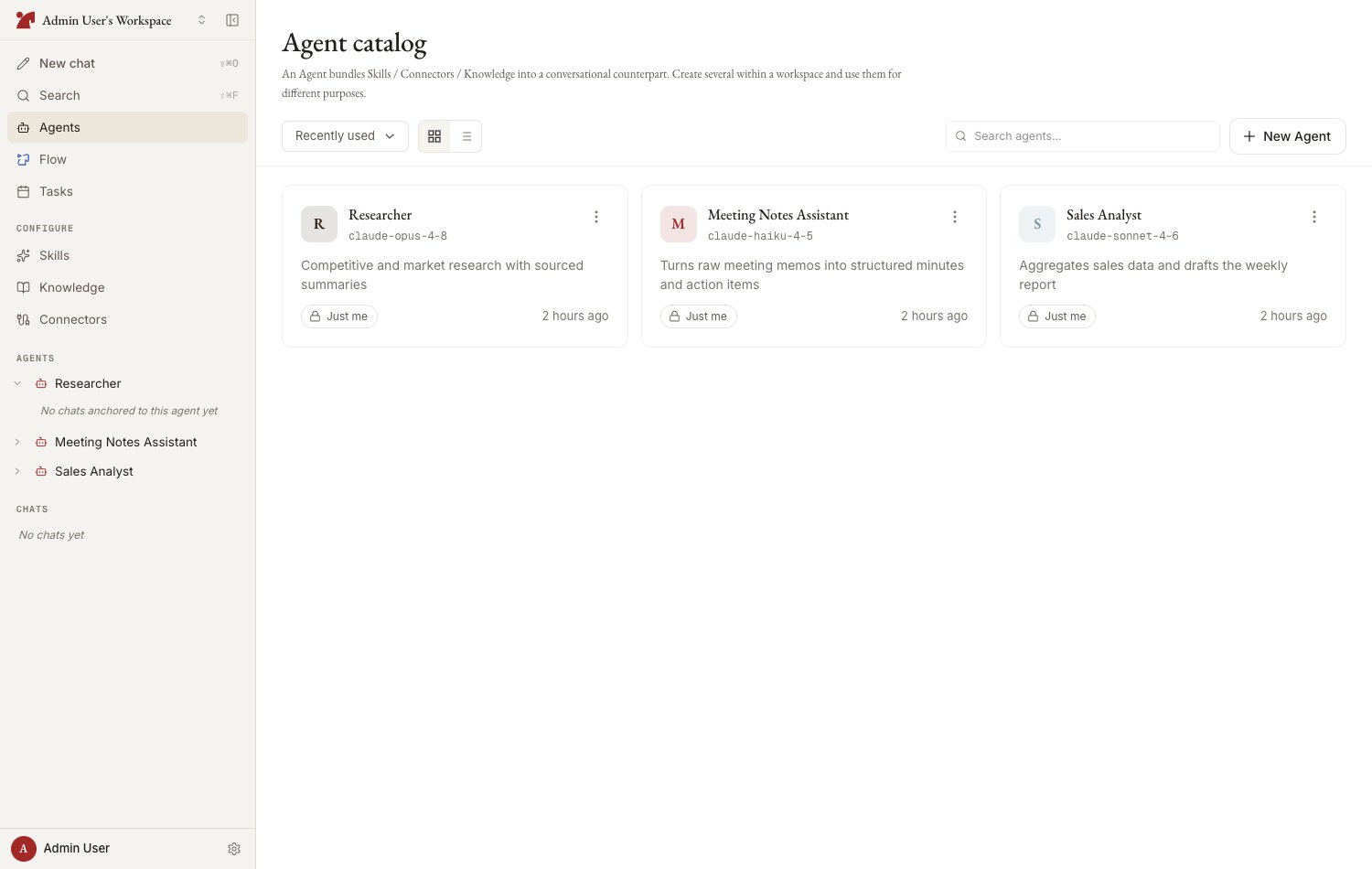
An **agent** is a conversation partner that bundles skills, connectors, and knowledge. Create several in a workspace and switch between them by purpose.
 ## What an agent has
| Component | Description |
| ----------------- | ------------------------------------------------------------------------------------------- |
| **Model** | The Claude model that generates responses (Opus 4.8 / Sonnet 4.6 / Haiku 4.5) |
| **System prompt** | Instructions for behavior, tone, and constraints |
| **Skills** | Attached playbooks and instructions |
| **Connectors** | Attached external service integrations (jinba-flow, MCP) |
| **Knowledge** | Attached reference material |
| **Memory** | What the AI has learned from conversations with this agent (shared by everyone who uses it) |
## Agent list
Open the workspace's agent catalog from "Agents" in the sidebar.
* **View toggle** — grid / list
* **Sort** — recently used / creation date / name
* **Search** — filter by name
* **Pinning** — pin frequently used agents for quick access from the sidebar, and put pinned agents first with "**Pinned first**"
The view, sort, and "Pinned first" choices are remembered on the device you are using, so the catalog comes back the way you left it. A link that carries an explicit view or sort in its URL wins over the remembered choice.
## Agent detail page
Selecting an agent opens its detail page — a chat surface for that agent where you start new chats and revisit past ones. Press the **gear icon** in the header to open the **configuration panel** on the right (it can be resized by dragging its edge), organized into sections:
| Section | Contents |
| ----------------------- | ------------------------------------------------------------------------------------------------ |
| **Skills** | Attach or create skills |
| **Flow connectors** | jinba-flow workspace connections |
| **External connectors** | Custom MCP servers and other connectors |
| **Knowledge** | Attach knowledge or register agent-specific material |
| **Memory** | View and manage agent memory |
| **Settings** | Name, description, model, system prompt, avatar, version history, duplicate, archive, and delete |
The `‹` chevron beside the agent's name always goes **up to the agent catalog**, whichever screen you arrived from — use your browser's back button to retrace your steps instead.
Each section card shows a count and a short preview of what is attached. Click the card header ("Manage" / "Edit") to open the section, or click a preview row to jump straight to that item. The panel state — which section and item you have open — is reflected in the page URL, so it survives reloads and can be shared with teammates as a link.
## Permissions
* An agent's settings can be changed by its **creator**, a **workspace owner**, or members granted "Can edit" permission when the agent was shared
* Members with "Use only" permission can chat with the agent but cannot change its settings
## Next steps
Setting the name, model, and system prompt — with auto-generation
How to attach skills, connectors, and knowledge
Configuring sharing scope and permissions
Version history, archiving, and deletion
## What an agent has
| Component | Description |
| ----------------- | ------------------------------------------------------------------------------------------- |
| **Model** | The Claude model that generates responses (Opus 4.8 / Sonnet 4.6 / Haiku 4.5) |
| **System prompt** | Instructions for behavior, tone, and constraints |
| **Skills** | Attached playbooks and instructions |
| **Connectors** | Attached external service integrations (jinba-flow, MCP) |
| **Knowledge** | Attached reference material |
| **Memory** | What the AI has learned from conversations with this agent (shared by everyone who uses it) |
## Agent list
Open the workspace's agent catalog from "Agents" in the sidebar.
* **View toggle** — grid / list
* **Sort** — recently used / creation date / name
* **Search** — filter by name
* **Pinning** — pin frequently used agents for quick access from the sidebar, and put pinned agents first with "**Pinned first**"
The view, sort, and "Pinned first" choices are remembered on the device you are using, so the catalog comes back the way you left it. A link that carries an explicit view or sort in its URL wins over the remembered choice.
## Agent detail page
Selecting an agent opens its detail page — a chat surface for that agent where you start new chats and revisit past ones. Press the **gear icon** in the header to open the **configuration panel** on the right (it can be resized by dragging its edge), organized into sections:
| Section | Contents |
| ----------------------- | ------------------------------------------------------------------------------------------------ |
| **Skills** | Attach or create skills |
| **Flow connectors** | jinba-flow workspace connections |
| **External connectors** | Custom MCP servers and other connectors |
| **Knowledge** | Attach knowledge or register agent-specific material |
| **Memory** | View and manage agent memory |
| **Settings** | Name, description, model, system prompt, avatar, version history, duplicate, archive, and delete |
The `‹` chevron beside the agent's name always goes **up to the agent catalog**, whichever screen you arrived from — use your browser's back button to retrace your steps instead.
Each section card shows a count and a short preview of what is attached. Click the card header ("Manage" / "Edit") to open the section, or click a preview row to jump straight to that item. The panel state — which section and item you have open — is reflected in the page URL, so it survives reloads and can be shared with teammates as a link.
## Permissions
* An agent's settings can be changed by its **creator**, a **workspace owner**, or members granted "Can edit" permission when the agent was shared
* Members with "Use only" permission can chat with the agent but cannot change its settings
## Next steps
Setting the name, model, and system prompt — with auto-generation
How to attach skills, connectors, and knowledge
Configuring sharing scope and permissions
Version history, archiving, and deletion