> ## Documentation Index
> Fetch the complete documentation index at: https://docs.jinba.io/llms.txt
> Use this file to discover all available pages before exploring further.
# API
> Learn how to call your published workflows via API
 ## Overview
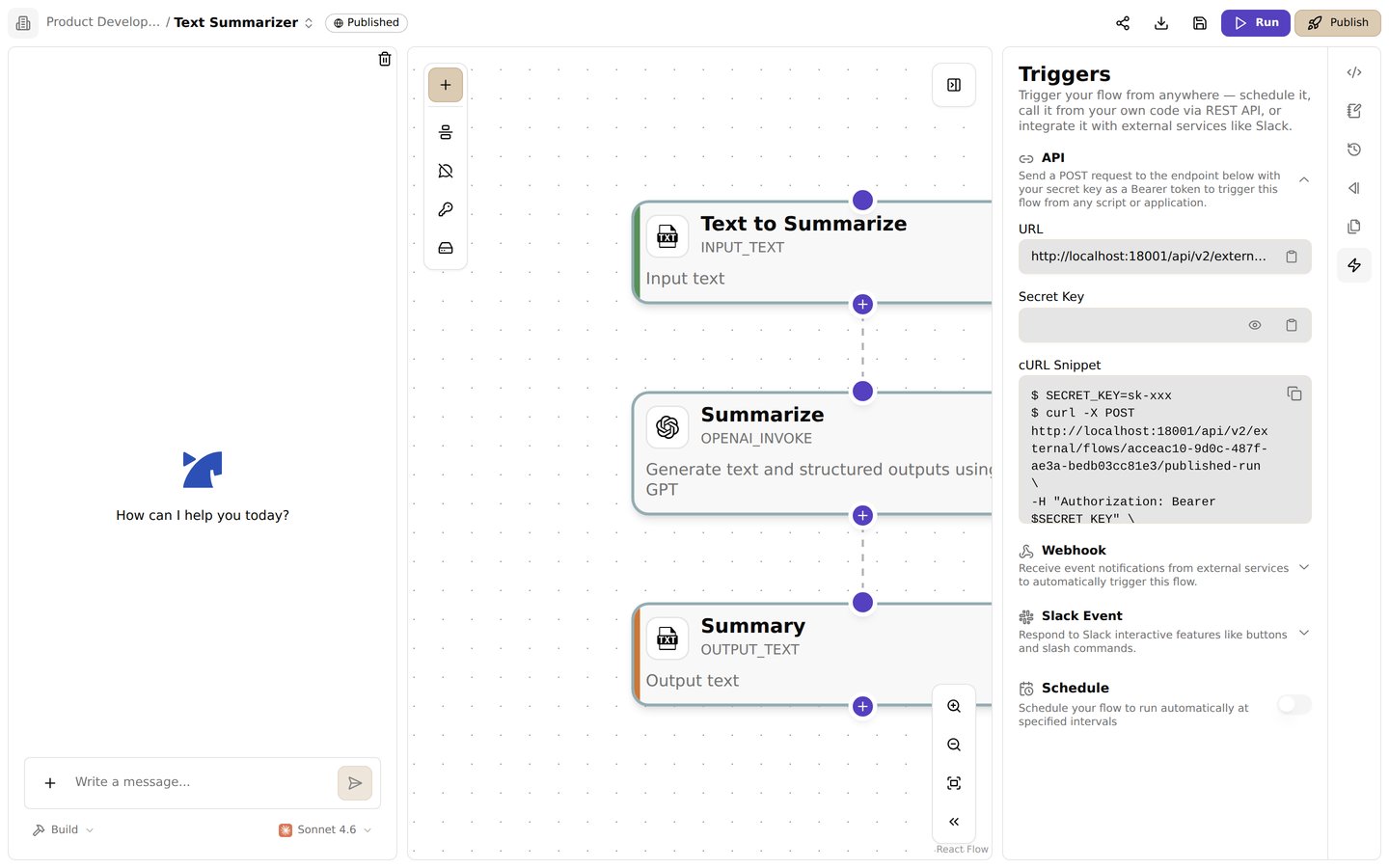
Jinba Flow provides REST API endpoints that allow you to execute published workflows programmatically. Once a workflow is published, you can call it from external systems, webhooks, or any application that can make HTTP requests.
## API Access
### Prerequisites
To use the API, you need:
1. **Published Workflow**: The workflow must be published (see [Publish](/en/pages/basics/publish))
2. **API Key**: An API key is automatically generated when you publish a workflow
3. **Authentication**: Use the API key in the Authorization header
### API Endpoints
#### Run Published Workflow
**Endpoint**: `POST /api/v2/external/flows/{flowId}/published-run`
**Authentication**: Bearer token (API key)
**Request Body**:
```json theme={null}
{
"args": [
{
"name": "input1",
"value": "example value"
}
],
"mode": "sync" // or "async"
}
```
**Response**: Workflow execution result
## Authentication
### API Keys
When you publish a workflow, an API key is automatically generated:
* **Automatic Generation**: Created when you first publish
* **Flow-Scoped**: Each workflow has its own API key
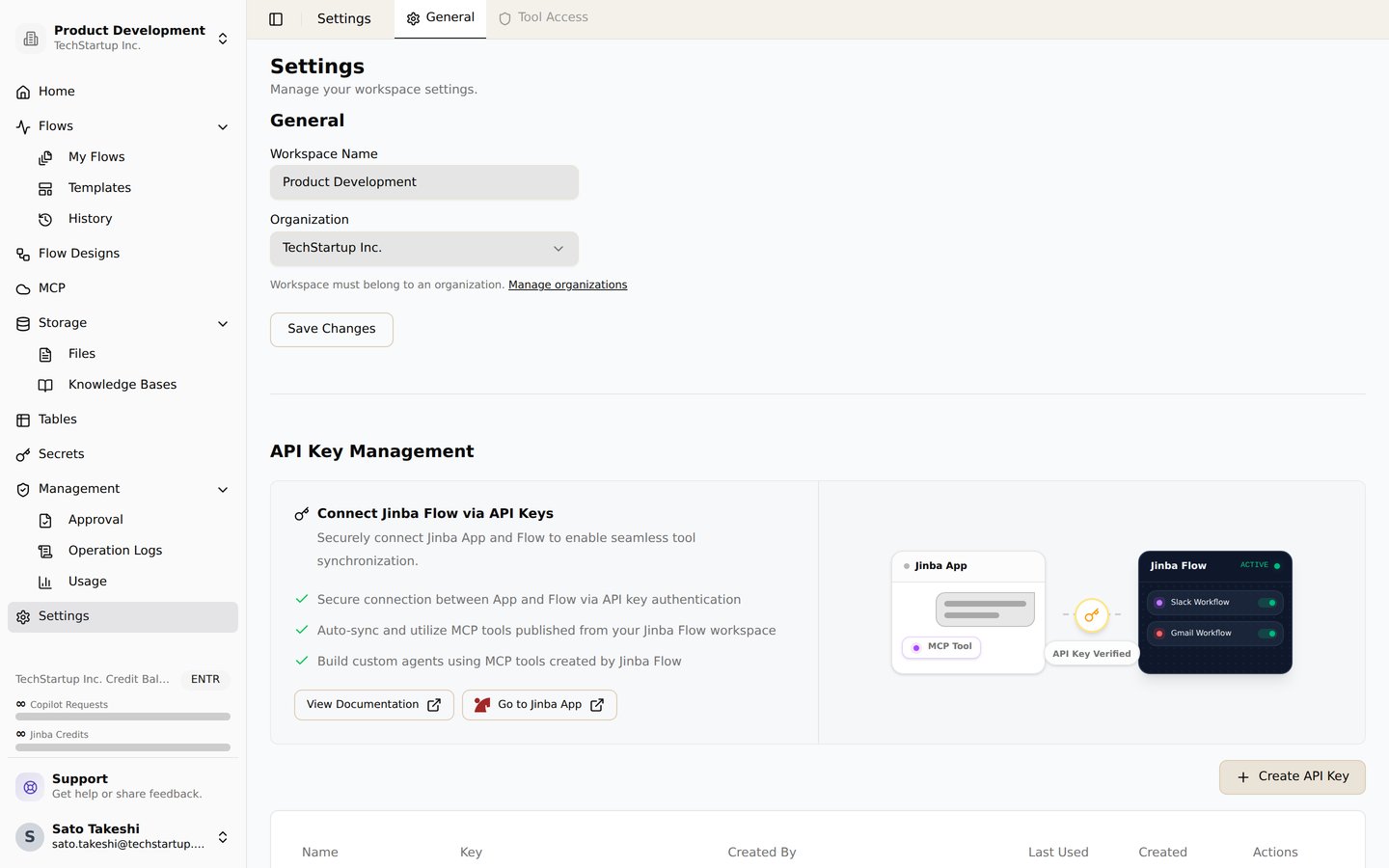
* **Secure Storage**: Keys are stored securely in your workspace
* **Viewing Keys**: Access keys from workflow settings
### Using API Keys
Include your API key in the Authorization header:
```bash theme={null}
Authorization: Bearer YOUR_API_KEY
```
**Security Best Practices**:
* Never share API keys publicly
* Store keys securely in environment variables
* Rotate keys regularly if compromised
* Use different keys for different environments
## Calling Workflows via API
### Synchronous Execution
Synchronous execution waits for the workflow to complete before returning:
```bash theme={null}
curl -X POST https://api.jinba.dev/api/v2/external/flows/{flow-id}/published-run \
-H "Authorization: Bearer YOUR_API_KEY" \
-H "Content-Type: application/json" \
-d '{
"args": [
{"name": "input1", "value": "example"}
],
"mode": "sync"
}'
```
**Characteristics**:
* **Blocking**: Request waits for completion
* **Immediate Response**: Returns result when workflow finishes
* **Timeout**: May timeout for long-running workflows
* **Use Case**: When you need immediate results
### Asynchronous Execution
Asynchronous execution returns immediately and runs the workflow in the background:
```bash theme={null}
curl -X POST https://api.jinba.dev/api/v2/external/flows/{flow-id}/published-run \
-H "Authorization: Bearer YOUR_API_KEY" \
-H "Content-Type: application/json" \
-d '{
"args": [
{"name": "input1", "value": "example"}
],
"mode": "async"
}'
```
**Characteristics**:
* **Non-Blocking**: Returns immediately with run ID
* **Background Execution**: Workflow runs asynchronously
* **Status Check**: Use run ID to check status later
* **Use Case**: For long-running workflows or fire-and-forget scenarios
## Input Arguments
### Argument Format
Arguments are passed as an array of name-value pairs:
```json theme={null}
{
"args": [
{
"name": "parameter_name",
"value": "parameter_value"
}
]
}
```
### Argument Types
Arguments can be:
* **Strings**: Text values
* **Numbers**: Numeric values
* **Booleans**: True/false values
* **Objects**: Complex nested data structures
* **Arrays**: Lists of values
### Example Arguments
```json theme={null}
{
"args": [
{
"name": "email",
"value": "user@example.com"
},
{
"name": "count",
"value": 10
},
{
"name": "options",
"value": {
"includeMetadata": true,
"format": "json"
}
}
]
}
```
## Response Format
### Success Response
```json theme={null}
{
"status": "success",
"result": {
// Workflow output
},
"stepOutputs": {
"step_1": {
"status": "success",
"result": {}
}
}
}
```
### Error Response
```json theme={null}
{
"status": "failed",
"error": {
"name": "ErrorType",
"value": "Error message",
"traceback": "Stack trace"
},
"stepOutputs": {
"step_1": {
"status": "failed",
"error": {
"name": "StepError",
"value": "Step error message"
}
}
}
}
```
## API Usage Examples
### Python Example
```python theme={null}
import requests
url = "https://api.jinba.dev/api/v2/external/flows/{flow-id}/published-run"
headers = {
"Authorization": "Bearer YOUR_API_KEY",
"Content-Type": "application/json"
}
data = {
"args": [
{"name": "input1", "value": "example"}
],
"mode": "sync"
}
response = requests.post(url, headers=headers, json=data)
result = response.json()
print(result)
```
### JavaScript/Node.js Example
```javascript theme={null}
const fetch = require('node-fetch');
const url = 'https://api.jinba.dev/api/v2/external/flows/{flow-id}/published-run';
const headers = {
'Authorization': 'Bearer YOUR_API_KEY',
'Content-Type': 'application/json'
};
const body = {
args: [
{ name: 'input1', value: 'example' }
],
mode: 'sync'
};
fetch(url, {
method: 'POST',
headers: headers,
body: JSON.stringify(body)
})
.then(res => res.json())
.then(data => console.log(data))
.catch(error => console.error('Error:', error));
```
### Webhook Integration
You can call workflows from webhooks:
```bash theme={null}
# Example webhook payload
curl -X POST https://api.jinba.dev/api/v2/external/flows/{flow-id}/published-run \
-H "Authorization: Bearer YOUR_API_KEY" \
-H "Content-Type: application/json" \
-d '{
"args": [
{"name": "webhook_data", "value": "{\"event\": \"user_signup\", \"user_id\": 123}"}
]
}'
```
## Error Handling
### Common Errors
#### 401 Unauthorized
**Cause**: Invalid or missing API key
**Solution**: Verify your API key is correct and included in the Authorization header
#### 404 Not Found
**Cause**: Workflow not found or not published
**Solution**:
* Verify the workflow ID is correct
* Ensure the workflow is published
* Check that the workflow is not archived
#### 403 Forbidden
**Cause**: API key doesn't have access to this workflow
**Solution**: Verify the API key is scoped to the correct workflow or workspace
#### 400 Bad Request
**Cause**: Invalid request format or missing required arguments
**Solution**:
* Check request body format
* Verify all required arguments are provided
* Validate argument types match workflow expectations
### Retry Logic
For production applications, implement retry logic:
```python theme={null}
import time
import requests
def call_workflow_with_retry(url, headers, data, max_retries=3):
for attempt in range(max_retries):
try:
response = requests.post(url, headers=headers, json=data, timeout=30)
if response.status_code == 200:
return response.json()
elif response.status_code == 429: # Rate limit
time.sleep(2 ** attempt) # Exponential backoff
continue
else:
response.raise_for_status()
except requests.exceptions.RequestException as e:
if attempt == max_retries - 1:
raise
time.sleep(2 ** attempt)
return None
```
## Rate Limiting
API requests may be subject to rate limiting:
* **Rate Limits**: Limits may apply based on your subscription plan
* **429 Status**: Returns 429 Too Many Requests when limit exceeded
* **Retry-After**: Header indicates when to retry
* **Best Practice**: Implement exponential backoff for retries
## API Key Management
### Viewing API Keys
1. Open your published workflow
2. Navigate to workflow settings
3. Go to **API** or **Publish Settings** section
4. View your API key
### Regenerating API Keys
If your API key is compromised:
1. Go to workflow settings
2. Navigate to API section
3. Regenerate the API key
4. Update all applications using the old key
**Important**: Regenerating a key invalidates the old key immediately.
## Best Practices
1. **Use Environment Variables**: Store API keys in environment variables, not in code
2. **Error Handling**: Implement proper error handling and retry logic
3. **Timeout Configuration**: Set appropriate timeouts for API calls
4. **Logging**: Log API calls for debugging and monitoring
5. **Security**: Never commit API keys to version control
6. **Async for Long Tasks**: Use async mode for long-running workflows
7. **Input Validation**: Validate inputs before sending to API
## Related Features
* [Publish](/en/pages/basics/publish) - Learn about publishing workflows
* [Scheduling](/en/pages/basics/scheduling) - Learn about scheduling workflows
* [Workspace](/en/pages/basics/workspace) - Learn about workspace management
## Overview
Jinba Flow provides REST API endpoints that allow you to execute published workflows programmatically. Once a workflow is published, you can call it from external systems, webhooks, or any application that can make HTTP requests.
## API Access
### Prerequisites
To use the API, you need:
1. **Published Workflow**: The workflow must be published (see [Publish](/en/pages/basics/publish))
2. **API Key**: An API key is automatically generated when you publish a workflow
3. **Authentication**: Use the API key in the Authorization header
### API Endpoints
#### Run Published Workflow
**Endpoint**: `POST /api/v2/external/flows/{flowId}/published-run`
**Authentication**: Bearer token (API key)
**Request Body**:
```json theme={null}
{
"args": [
{
"name": "input1",
"value": "example value"
}
],
"mode": "sync" // or "async"
}
```
**Response**: Workflow execution result
## Authentication
### API Keys
When you publish a workflow, an API key is automatically generated:
* **Automatic Generation**: Created when you first publish
* **Flow-Scoped**: Each workflow has its own API key
* **Secure Storage**: Keys are stored securely in your workspace
* **Viewing Keys**: Access keys from workflow settings
### Using API Keys
Include your API key in the Authorization header:
```bash theme={null}
Authorization: Bearer YOUR_API_KEY
```
**Security Best Practices**:
* Never share API keys publicly
* Store keys securely in environment variables
* Rotate keys regularly if compromised
* Use different keys for different environments
## Calling Workflows via API
### Synchronous Execution
Synchronous execution waits for the workflow to complete before returning:
```bash theme={null}
curl -X POST https://api.jinba.dev/api/v2/external/flows/{flow-id}/published-run \
-H "Authorization: Bearer YOUR_API_KEY" \
-H "Content-Type: application/json" \
-d '{
"args": [
{"name": "input1", "value": "example"}
],
"mode": "sync"
}'
```
**Characteristics**:
* **Blocking**: Request waits for completion
* **Immediate Response**: Returns result when workflow finishes
* **Timeout**: May timeout for long-running workflows
* **Use Case**: When you need immediate results
### Asynchronous Execution
Asynchronous execution returns immediately and runs the workflow in the background:
```bash theme={null}
curl -X POST https://api.jinba.dev/api/v2/external/flows/{flow-id}/published-run \
-H "Authorization: Bearer YOUR_API_KEY" \
-H "Content-Type: application/json" \
-d '{
"args": [
{"name": "input1", "value": "example"}
],
"mode": "async"
}'
```
**Characteristics**:
* **Non-Blocking**: Returns immediately with run ID
* **Background Execution**: Workflow runs asynchronously
* **Status Check**: Use run ID to check status later
* **Use Case**: For long-running workflows or fire-and-forget scenarios
## Input Arguments
### Argument Format
Arguments are passed as an array of name-value pairs:
```json theme={null}
{
"args": [
{
"name": "parameter_name",
"value": "parameter_value"
}
]
}
```
### Argument Types
Arguments can be:
* **Strings**: Text values
* **Numbers**: Numeric values
* **Booleans**: True/false values
* **Objects**: Complex nested data structures
* **Arrays**: Lists of values
### Example Arguments
```json theme={null}
{
"args": [
{
"name": "email",
"value": "user@example.com"
},
{
"name": "count",
"value": 10
},
{
"name": "options",
"value": {
"includeMetadata": true,
"format": "json"
}
}
]
}
```
## Response Format
### Success Response
```json theme={null}
{
"status": "success",
"result": {
// Workflow output
},
"stepOutputs": {
"step_1": {
"status": "success",
"result": {}
}
}
}
```
### Error Response
```json theme={null}
{
"status": "failed",
"error": {
"name": "ErrorType",
"value": "Error message",
"traceback": "Stack trace"
},
"stepOutputs": {
"step_1": {
"status": "failed",
"error": {
"name": "StepError",
"value": "Step error message"
}
}
}
}
```
## API Usage Examples
### Python Example
```python theme={null}
import requests
url = "https://api.jinba.dev/api/v2/external/flows/{flow-id}/published-run"
headers = {
"Authorization": "Bearer YOUR_API_KEY",
"Content-Type": "application/json"
}
data = {
"args": [
{"name": "input1", "value": "example"}
],
"mode": "sync"
}
response = requests.post(url, headers=headers, json=data)
result = response.json()
print(result)
```
### JavaScript/Node.js Example
```javascript theme={null}
const fetch = require('node-fetch');
const url = 'https://api.jinba.dev/api/v2/external/flows/{flow-id}/published-run';
const headers = {
'Authorization': 'Bearer YOUR_API_KEY',
'Content-Type': 'application/json'
};
const body = {
args: [
{ name: 'input1', value: 'example' }
],
mode: 'sync'
};
fetch(url, {
method: 'POST',
headers: headers,
body: JSON.stringify(body)
})
.then(res => res.json())
.then(data => console.log(data))
.catch(error => console.error('Error:', error));
```
### Webhook Integration
You can call workflows from webhooks:
```bash theme={null}
# Example webhook payload
curl -X POST https://api.jinba.dev/api/v2/external/flows/{flow-id}/published-run \
-H "Authorization: Bearer YOUR_API_KEY" \
-H "Content-Type: application/json" \
-d '{
"args": [
{"name": "webhook_data", "value": "{\"event\": \"user_signup\", \"user_id\": 123}"}
]
}'
```
## Error Handling
### Common Errors
#### 401 Unauthorized
**Cause**: Invalid or missing API key
**Solution**: Verify your API key is correct and included in the Authorization header
#### 404 Not Found
**Cause**: Workflow not found or not published
**Solution**:
* Verify the workflow ID is correct
* Ensure the workflow is published
* Check that the workflow is not archived
#### 403 Forbidden
**Cause**: API key doesn't have access to this workflow
**Solution**: Verify the API key is scoped to the correct workflow or workspace
#### 400 Bad Request
**Cause**: Invalid request format or missing required arguments
**Solution**:
* Check request body format
* Verify all required arguments are provided
* Validate argument types match workflow expectations
### Retry Logic
For production applications, implement retry logic:
```python theme={null}
import time
import requests
def call_workflow_with_retry(url, headers, data, max_retries=3):
for attempt in range(max_retries):
try:
response = requests.post(url, headers=headers, json=data, timeout=30)
if response.status_code == 200:
return response.json()
elif response.status_code == 429: # Rate limit
time.sleep(2 ** attempt) # Exponential backoff
continue
else:
response.raise_for_status()
except requests.exceptions.RequestException as e:
if attempt == max_retries - 1:
raise
time.sleep(2 ** attempt)
return None
```
## Rate Limiting
API requests may be subject to rate limiting:
* **Rate Limits**: Limits may apply based on your subscription plan
* **429 Status**: Returns 429 Too Many Requests when limit exceeded
* **Retry-After**: Header indicates when to retry
* **Best Practice**: Implement exponential backoff for retries
## API Key Management
### Viewing API Keys
1. Open your published workflow
2. Navigate to workflow settings
3. Go to **API** or **Publish Settings** section
4. View your API key
### Regenerating API Keys
If your API key is compromised:
1. Go to workflow settings
2. Navigate to API section
3. Regenerate the API key
4. Update all applications using the old key
**Important**: Regenerating a key invalidates the old key immediately.
## Best Practices
1. **Use Environment Variables**: Store API keys in environment variables, not in code
2. **Error Handling**: Implement proper error handling and retry logic
3. **Timeout Configuration**: Set appropriate timeouts for API calls
4. **Logging**: Log API calls for debugging and monitoring
5. **Security**: Never commit API keys to version control
6. **Async for Long Tasks**: Use async mode for long-running workflows
7. **Input Validation**: Validate inputs before sending to API
## Related Features
* [Publish](/en/pages/basics/publish) - Learn about publishing workflows
* [Scheduling](/en/pages/basics/scheduling) - Learn about scheduling workflows
* [Workspace](/en/pages/basics/workspace) - Learn about workspace management